ByBit API Setup Guide
Create your API Keys on ByBit and connect them with your Thomas Boleto Discord Bot
Please make sure you complete your ByBit account verification. ByBit allows API key creation only for accounts that have completed their Basic and Intermediate Verification. If you haven't completed both of your account's Basic and Intermediate verification procedures, kindly go back to ByBit and complete it. Once your account is verified, you will be able to complete the steps.
The following are the necessary steps to create an API key on the ByBit exchange that can be used for trading using coins-futures (COIN-M and USD-M pairs). This guide is specifically for connecting to the Thomas Boleto Discord Trading Bot.
Login to ByBit
Login to your ByBit account.

Click on the user icon in the upper right corner
After logging in, click on the user icon located in the upper right corner of the ByBit interface.

Click 'API' and then 'Create New Key'
From the dropdown menu, click on 'API' and then select 'Create New Key' to start the API creation process.
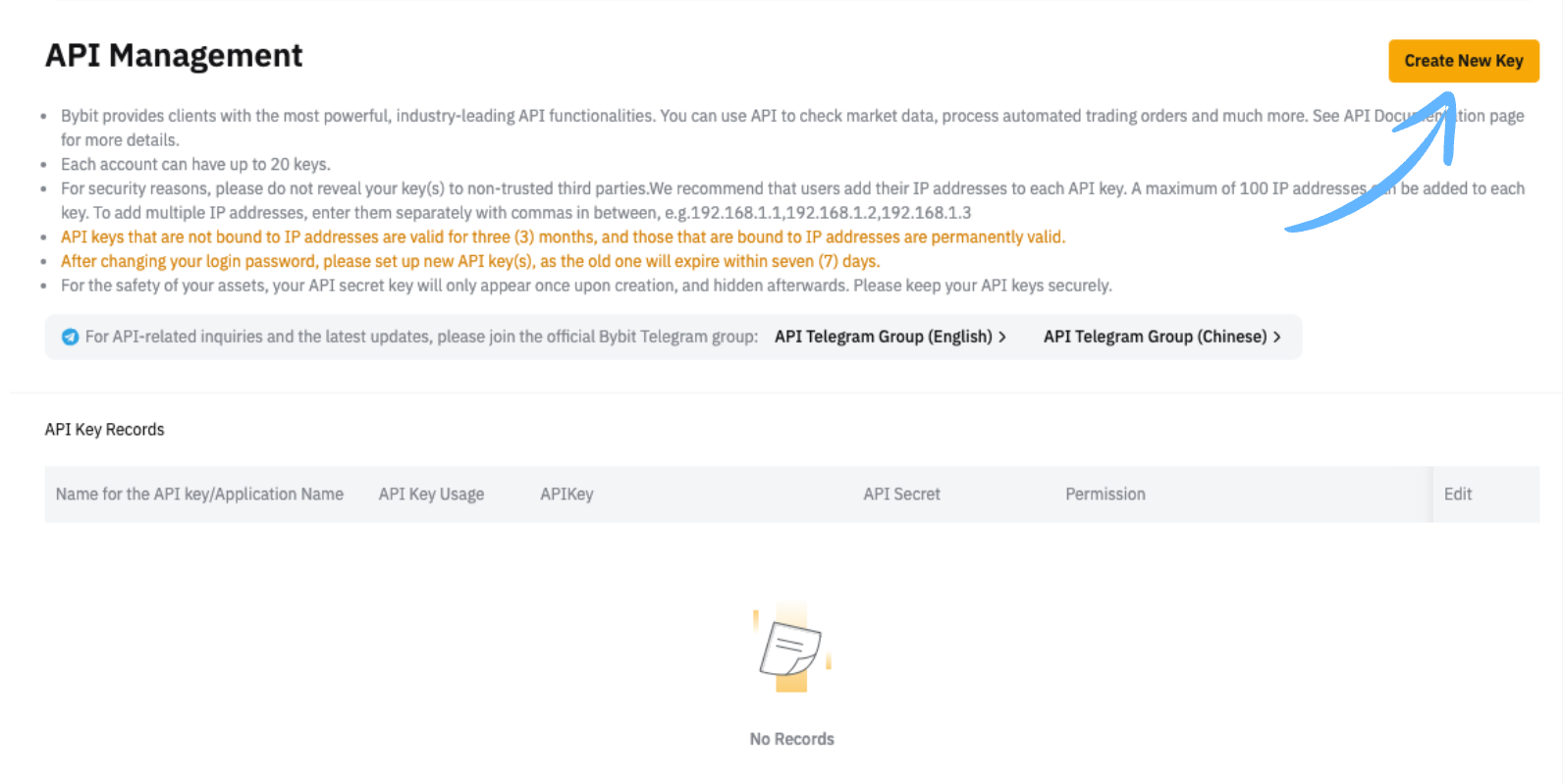
Note: If you already have existing API keys, they will be listed here. The "Create New Key" button is typically located in the top right corner.
Click 'API' and then 'Create New Key'
On the popup window choose API key type – System-generated API Keys
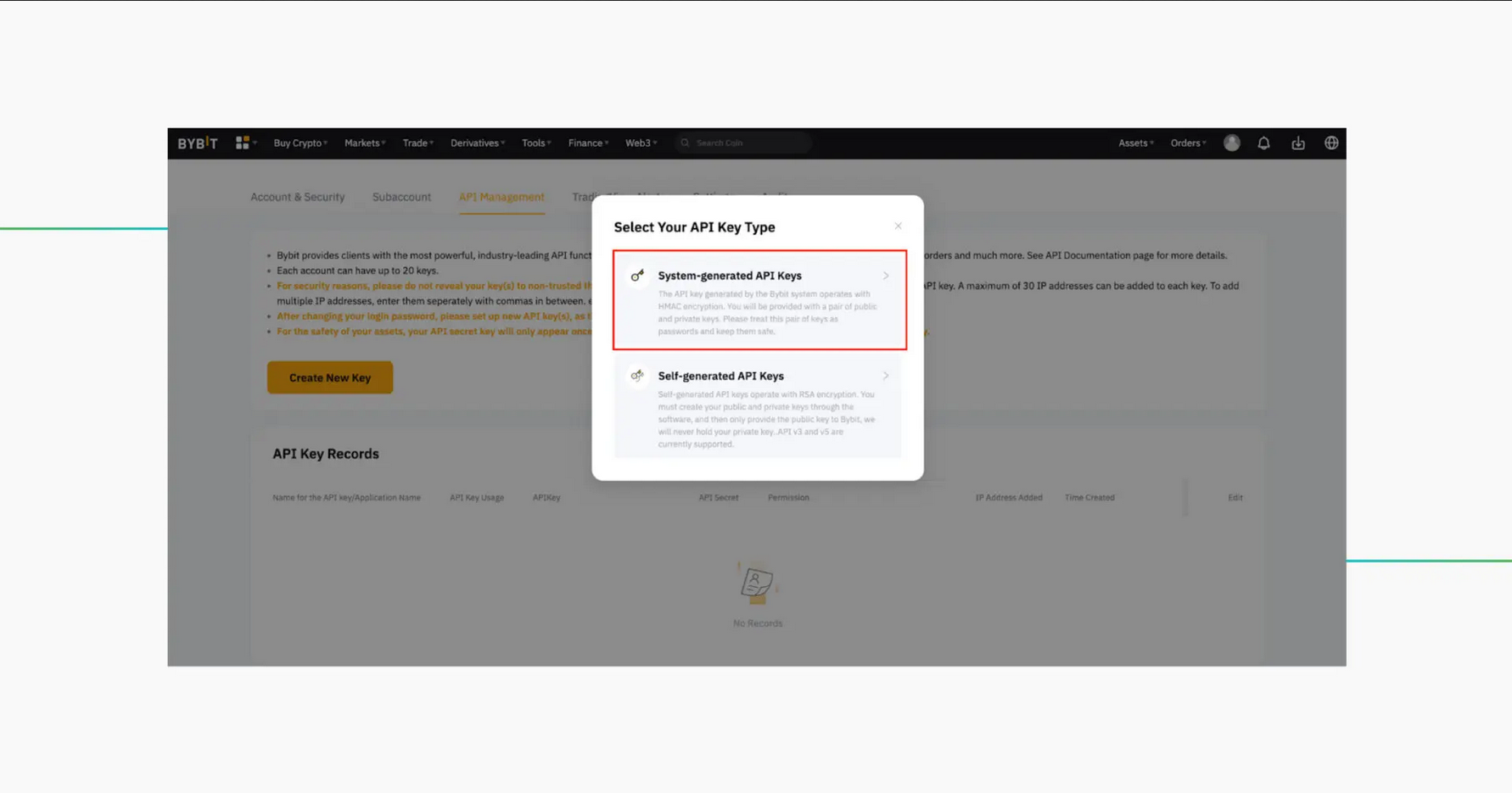
Choose the 'API Transaction'
Select the 'API Transaction' option. This is the correct setting for connecting to the Discord trading bot. cuz Connect to the Third-Party Applications need your account to be UTA if you upgarde it then choice Connect to Third-Party Applications
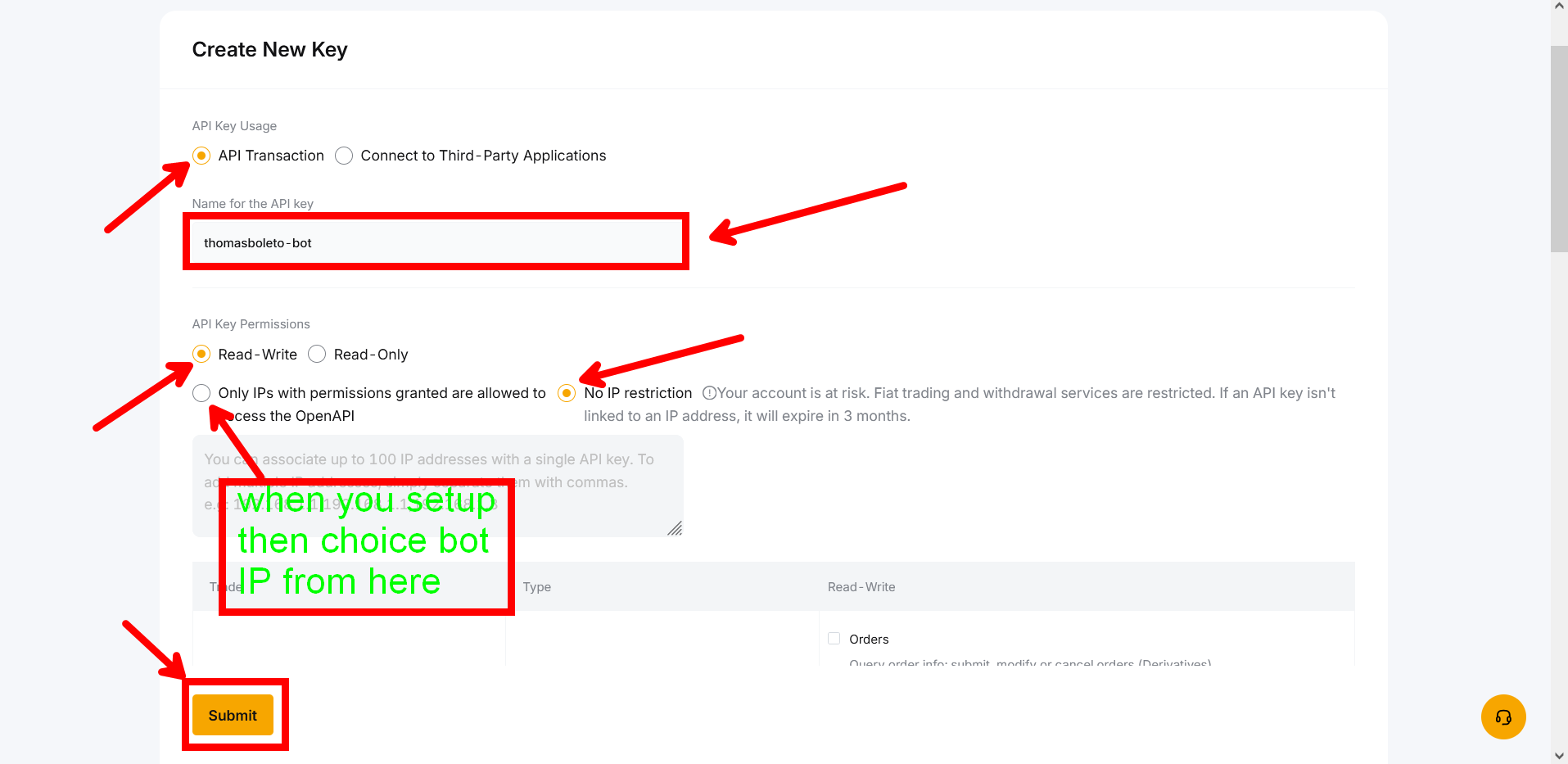
Type name for the API key
After choinig API Transaction give it a name as showing in picture Third-Party Applications we are working on it in future .
• ThomasBoleto-Discord-Bot
• Discord-Trading-Bot
• Futures-Trading-Bot
Select the 'Read-Write' permissions
Choose the 'Read-Write' permission option. This allows the bot to both read your account information and execute trades.
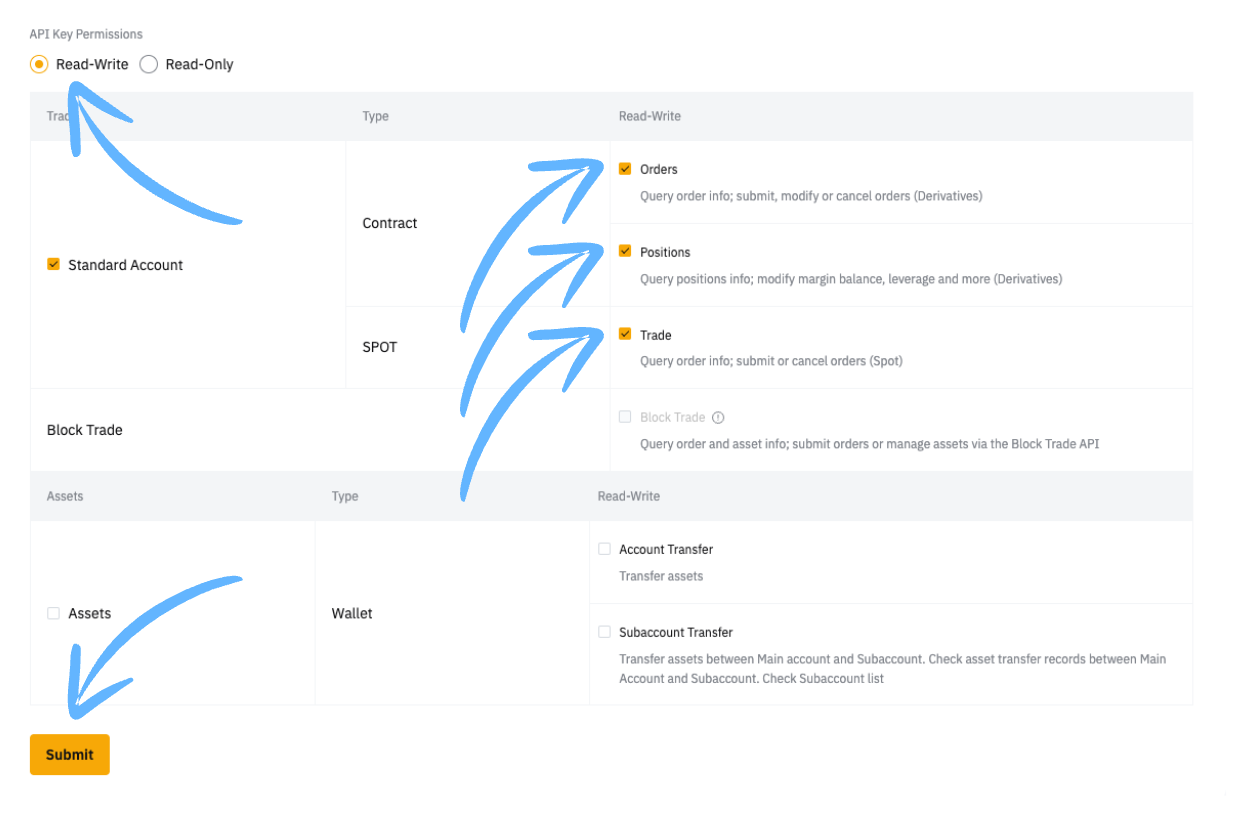
Set Contract and Spot Permissions
Configure the specific permissions as follows:
Never enable withdrawal permissions for trading bots. This is a critical security measure. The bot only needs trading permissions to execute trades on your behalf.
Click 'Submit' and Enter your 2FA code
Click the 'Submit' button and enter your 2FA code when prompted. This adds an extra layer of security to confirm the API creation.
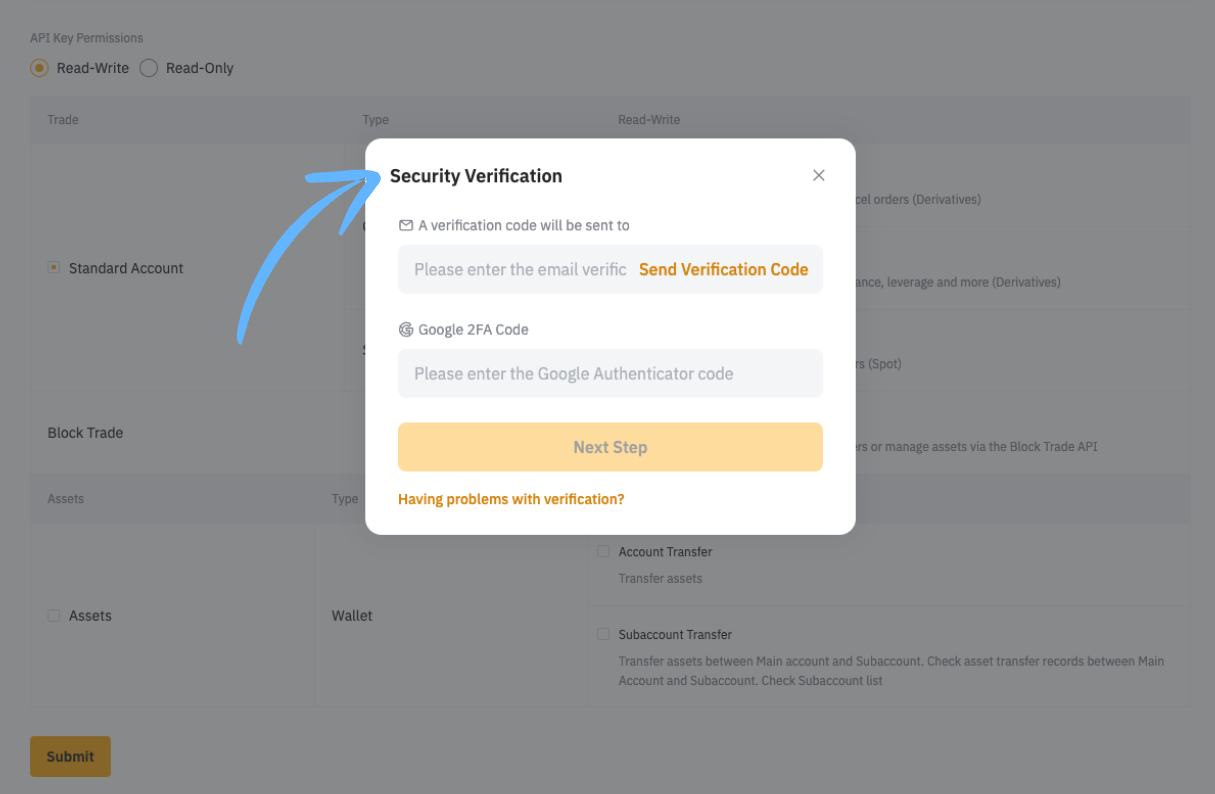
Important: For the Email/Phone number verification code to be sent to you, you will need to click the Send Code button as displayed in the screenshot.
Copy & Paste the API Key and Secret key
After verification, ByBit will display your API Key and Secret Key. Copy both keys immediately.

After verification, ByBit will display your API Key and Secret Key. The Secret Key is only shown ONCE. You must save both keys immediately in a secure location.
API Key:    hjasd87asd98as7d98a7sd...
Secret Key: KJHasd87asd9a8s7d98a7s9d8a7sd...

⚠️ Copy both to a secure location. The Secret Key will never be shown again.
Security Best Practice: Store these keys in a password manager or encrypted file. Never share them publicly or store them in unsecured locations.
Complete API Setup Process
1. Click 'Create New Key'
2. Under the API management, click 'Create New Key' and choose 'System-generated API Keys'.
3. Choose 'Connect to Third-Party Applications' and select 'Cornix'
4. Choose the 'Connect to Third-Party Applications' option and use the dropdown to select 'Cornix'.
5. Set the API Permissions
6. Proceed to set up the API connection permissions under the 'API permissions (check all that apply)' section.
7. Select the 'Read-Write' option
8. Under 'Contract' choose 'Orders' and 'Positions'
9. Under 'Spot' choose 'Trade'
10. Click 'Submit'
Security Verification
You will be requested to pass a Security Verification.
Copy your keys to Cornix
Copy the 'API Key' and 'Secret Key' to your Cornix bot, by clicking the copy button next to the keys.
After making sure everything is set properly, click the "Understood" button.
Add Your API to Thomas Boleto Discord Bot
Now that your API key is created and configured, follow these steps to connect it to your Discord bot.
Connection Steps:
API_Key: [Copy from ByBit]
Secret_Key: [Copy from ByBit - shown only once]
🔒 Only enter these in the Discord bot PRIVATE setup
✅ There's a video showing you everything or all of the above steps inside the Discord channel
👇 Picture down shows you in Private Direct message how to check using the above command
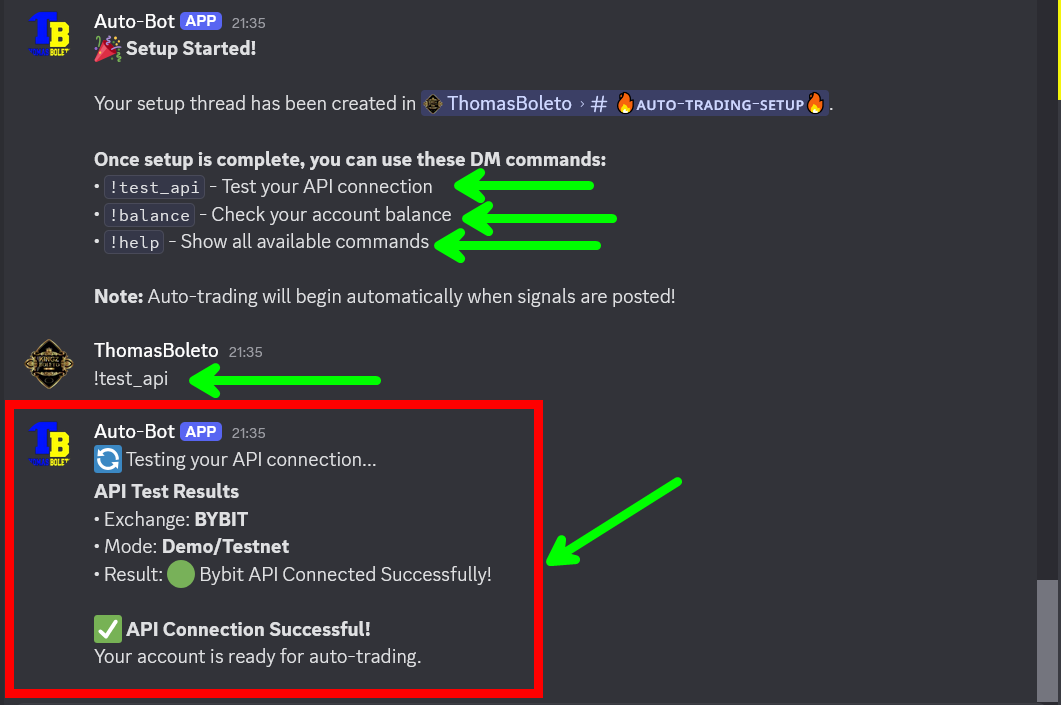
✅ Success: Once connected, you'll receive confirmation that your API keys have been validated and stored securely. The bot will now be able to execute trades and display your account information based on the permissions you granted.
⛔️ Important: there's tutorials video inside our Discord for each exchange plus even if you face any problem you can text me either in Telegram or Discord and we going to guide you more.
That's it, You are all set!
Your Thomas Boleto Discord Bot is now successfully connected to your ByBit account and ready for auto-trading.
✅ ByBit Auto-Trading Activated!
The bot will now automatically execute trades based on the signals you've configured. Monitor your account regularly and use the bot commands to check status, balance, and open positions.
