Complete API Setup Guide
Step-by-step tutorials for connecting your trading bot to 4 popular exchanges: OKX, KuCoin, BloFin, and Weex
Select Your Exchange
OKX
Best for BeginnersComplete verification required before API creation. Features demo trading for practice.
KuCoin
Futures TradingSeparate API keys for Spot and Futures trading. Complete KYC required.
BloFin
Professional PlatformInstitutional-grade exchange. Requires full verification and has no demo mode.
Weex
Simple SetupNo passphrase required. Streamlined API creation process.
OKX API Setup - Complete Guide
Follow these steps to create API keys on OKX and connect them to your trading bot. Make sure you have completed your OKX account verification before starting.
Please make sure you complete your OKX account verification. OKX allows API key creation only for accounts that have completed KYC verification. If you haven't completed verification, kindly go back to OKX and complete it first.
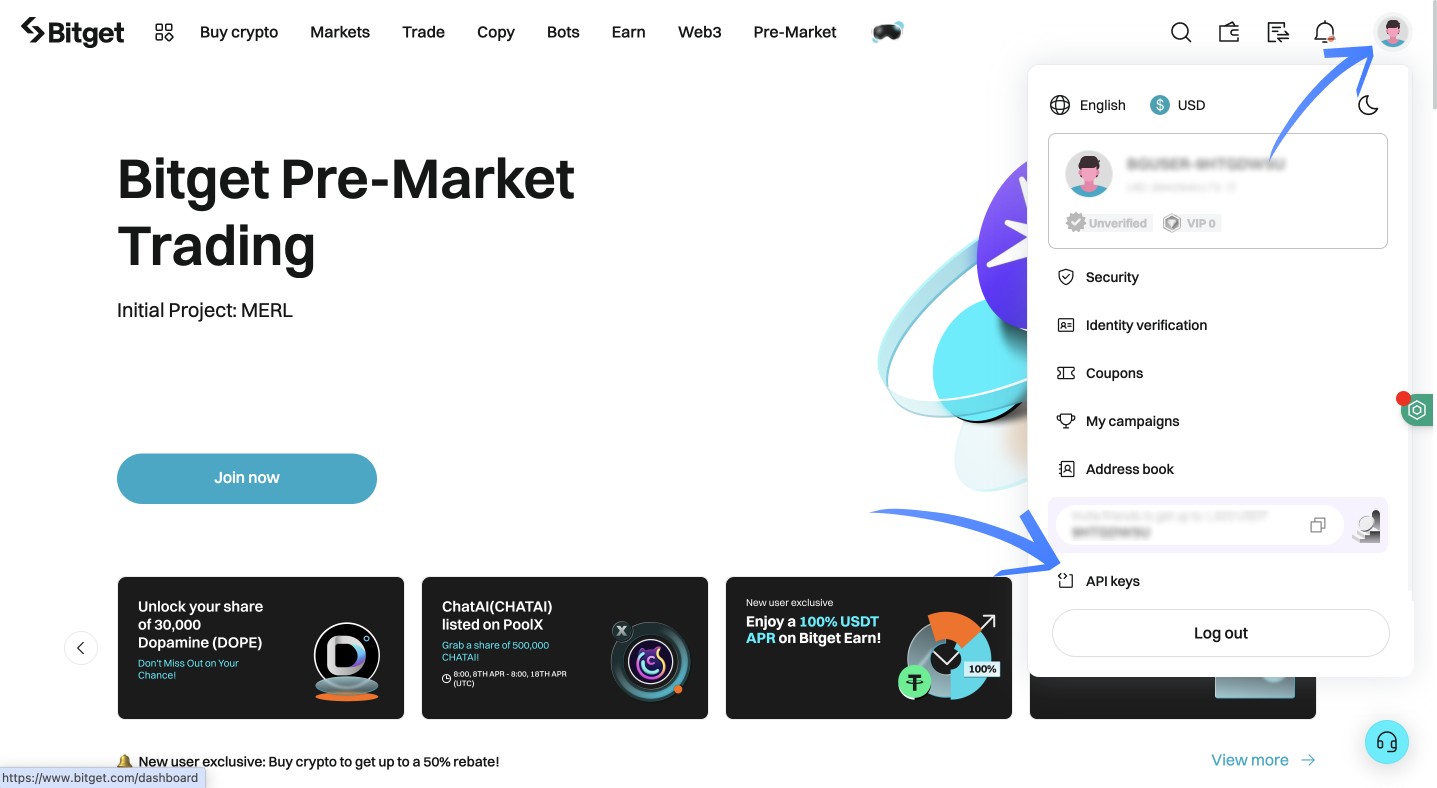
Navigate to API Management
- Log into your OKX account at www.okx.com
- Click your profile icon in the top right corner
- Select "API" from the dropdown menu
- You'll be redirected to the API Management page
Create API Key with Correct Permissions
- Click the "Create API" button
- Choose "V5 API" (not legacy V3)
- Enter a name for your API key (e.g., "TradingBot")
- Create a strong passphrase and save it immediately
- Set the following permissions:
- Join the Discord server where the bot is installed
- Navigate to the setup channel (usually named "setup" or "api-setup")
- Type the setup command: !setup
- Follow the bot's prompts to enter your API credentials
- Select OKX as your exchange when prompted
- Log into your KuCoin account at www.kucoin.com
- Click your profile icon in the top right
- Go to "API Management"
- Click "Create API"
- Select "Futures API" tab
- Click "Create API"
- Enter API name (e.g., "FuturesBot")
- Create and save a strong passphrase
- Enable these permissions:
- In your Discord server, go to the bot setup channel
- Type !setup and press Enter
- Select KuCoin when asked for exchange
- Enter your API credentials when prompted
- Wait for confirmation message
- Log into your BloFin account at www.blofin.com
- Click on your account profile
- Go to "API Management" or "Developer Settings"
- Click "Create API Key"
- Enter a descriptive name for your API key
- Create a strong passphrase (save it!)
- Enable the following permissions:
- Open Discord and navigate to your trading server
- Find the bot setup channel
- Type !setup and follow prompts
- Select BloFin as your exchange
- Enter your API credentials when asked
- Log into your Weex account at www.weex.com
- Click on your account/profile icon
- Navigate to "API Settings" or "Developer"
- Click "Create New API Key"
- Enter a name for your API key
- Enable the following permissions:
- In your Discord trading server, find the setup channel
- Type !setup and press Enter
- Select Weex as your exchange
- Enter your API Key and Secret Key when prompted
- Leave passphrase field blank (Weex doesn't use it)
- Read - To see your account balance and positions
- Trade - To execute buy/sell orders
- Futures Trading - If your bot trades futures contracts
- Go to your exchange account → API Management
- Find the API key you lost
- Click "Delete" or "Revoke" to disable it
- Create a new API key following the same steps
- Update your trading bot with the new keys
- API keys cannot withdraw funds unless you explicitly enable that permission (don't!)
- They can only trade within the permissions you set
- Start with small amounts to test
- Use demo accounts first if available
- Regularly monitor your account activity
- Wrong permissions: Make sure "Futures Trading" is enabled
- IP restrictions: Check if your exchange account has IP whitelisting enabled
- Key expiration: Some exchanges expire API keys after 90 days
- Incorrect passphrase: Double-check your passphrase (case-sensitive)
- Account verification: Ensure your exchange account is fully verified
Save Your API Credentials
After clicking "Confirm", OKX will display:
1. API Key (Public key)
2. Secret Key (Private key - shown ONLY ONCE)
3. Passphrase (What you just created)
Copy all three to a secure location immediately!
Connect to Discord Trading Bot
Discord Bot Commands
KuCoin API Setup - Complete Guide
Follow these steps to create Futures API keys on KuCoin and connect them to your trading bot. Note: KuCoin has separate APIs for Spot and Futures trading.
KuCoin requires separate API keys for Spot and Futures trading. Make sure you create a Futures API key for trading bot integration. Also ensure your account verification is complete.
Access API Management
Create Futures API Key
Save Your KuCoin API Keys
KuCoin will show three pieces of information only once:
1. API Key (Public identifier)
2. Secret Key (Private key - NEVER shown again)
3. Passphrase (Your chosen password)
Copy all three to a password manager or secure file!
Connect to Discord Bot
BloFin API Setup - Complete Guide
BloFin is a professional trading platform. Follow these steps to create API keys. Note: BloFin does not have a demo mode.
BloFin operates in production only (no demo mode). Start with very small position sizes ($10-20) when testing. Also, ensure your account is fully verified before API creation.
Navigate to API Settings
Create and Configure API Key
Save BloFin API Credentials
After creating the API key, BloFin will display:
• API Key
• Secret Key (Shown ONLY ONCE)
• Passphrase
Copy all three immediately to a secure location!
Connect to Discord Bot
Weex API Setup - Complete Guide
Weex has a simplified API setup process. Follow these steps to create API keys and connect to your trading bot.
Access API Management
Create API Key with Permissions
Save Weex API Keys
Weex will display two pieces of information:
1. API Key (Public key)
2. Secret Key (Private key - shown ONLY ONCE)
Copy both keys to a secure location immediately!
Note: Weex does not use a passphrase, so you only need these two keys.
Connect to Discord Bot
Frequently Asked Questions
For trading bots, you typically need:
Never enable: Withdraw or Transfer permissions. This keeps your funds safe even if your API keys are compromised.
If you lose your API keys:
This is why it's crucial to save your keys securely when you first create them.
Yes, with proper precautions:
Always treat API keys like passwords - keep them secure and never share them publicly.
Common issues and solutions:
If problems persist, delete the API key and create a new one.
Final Setup Checklist
Before You Start Trading
Need Help?
Additional Support Channels
If you encounter any issues during setup, you can get help through:
Note: There are video tutorials available in our Discord server for each exchange. If you face any problems during setup, join our community for step-by-step assistance.
